Everything you need to turn a rate sheet into a signed loan.
Let AI read the lender's fee sheet, build a side-by-side loan comparison with live charts, and share a polished report with your borrower — all in minutes, with nothing to install.
7 days free · card required · cancel anytime
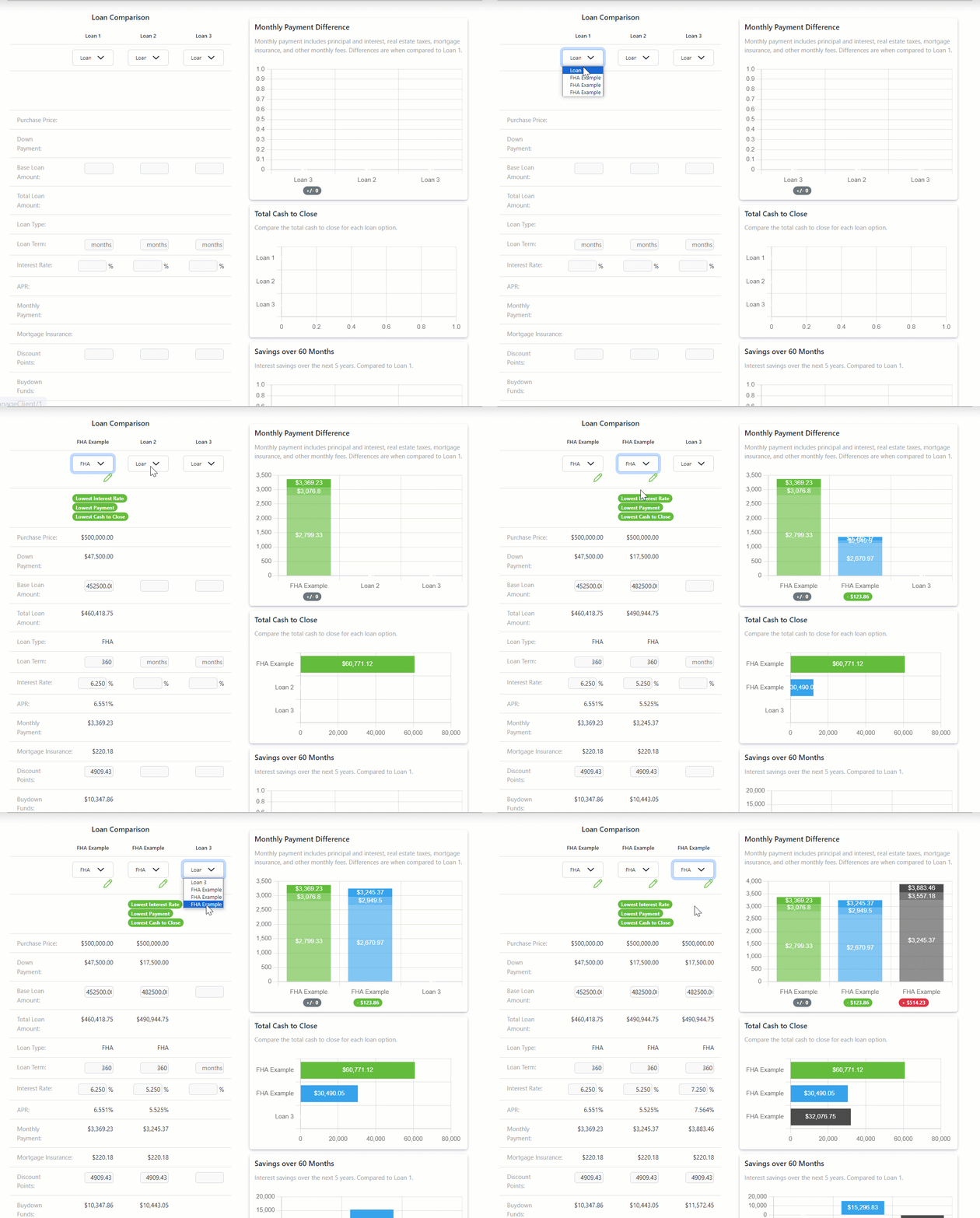
AI reads the fee sheet so you don’t have to
Upload a lender fee sheet, Loan Estimate or Closing Disclosure and AI reads the document for you. Fees, prepaids and loan details land in your LendrTech fee sheet, laid out for review — you check the numbers and save, instead of typing forty line items at 9pm. It reads what the lender sent; it never prices the loan.
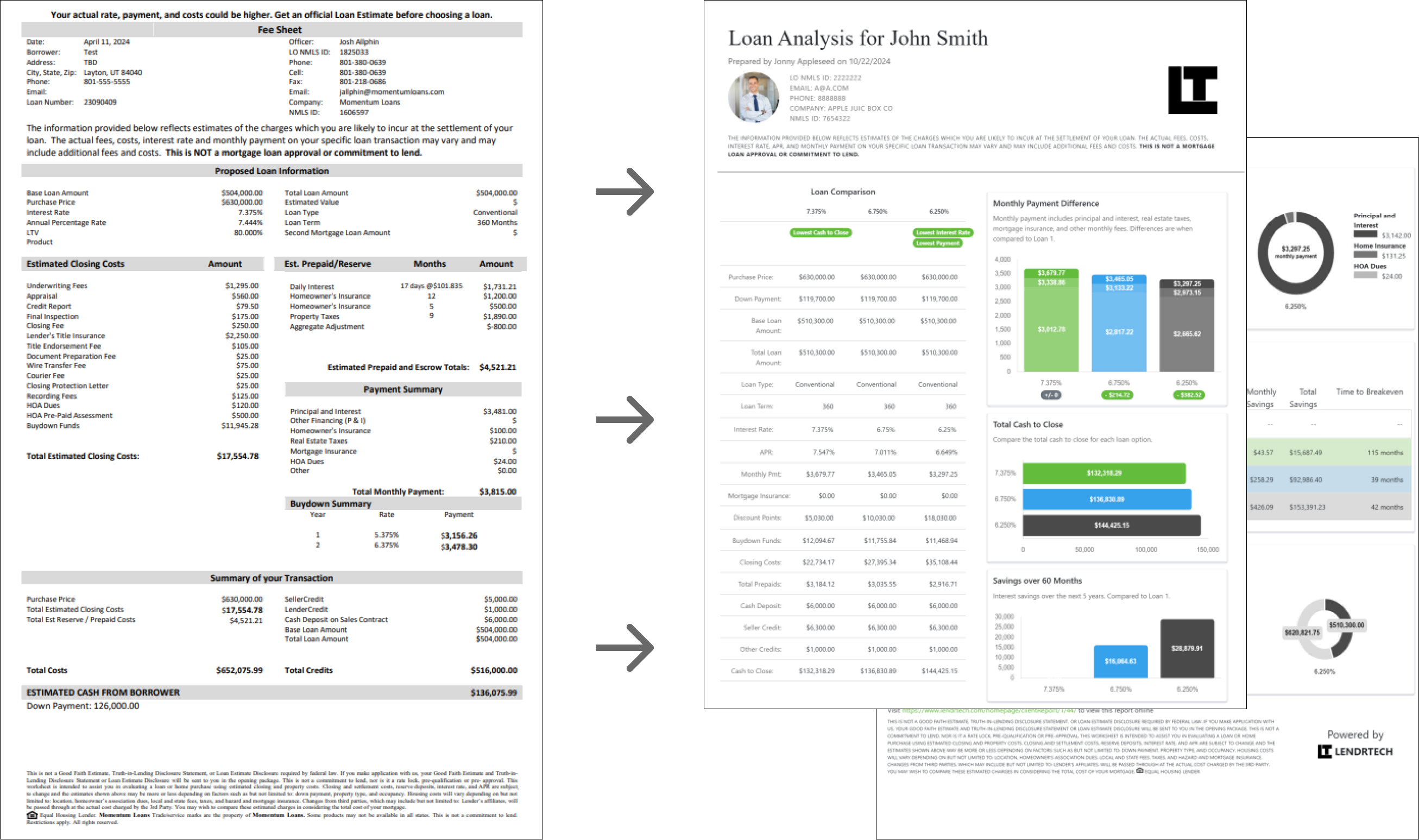
A report builder that updates as you type
Adjust rate, points, or any fee and watch every payment, APR, and chart recalculate in real time. Highlight the rows that matter, choose which charts appear, and drop custom notes anywhere on the page.
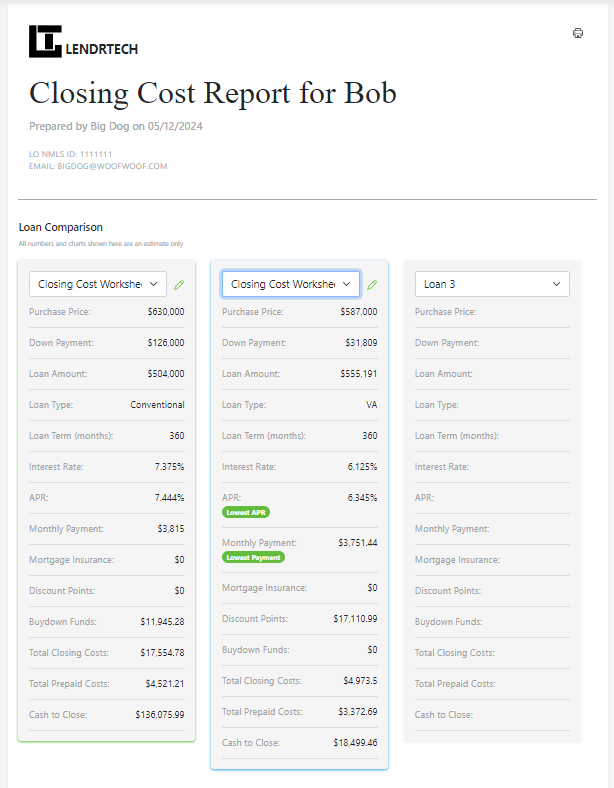
Purchase, refinance, and single-loan reports
Lay two or three loan options side by side, walk a borrower through a refinance break-even, or present a single scenario cleanly. Every report type gets the same polished, borrower-ready output.
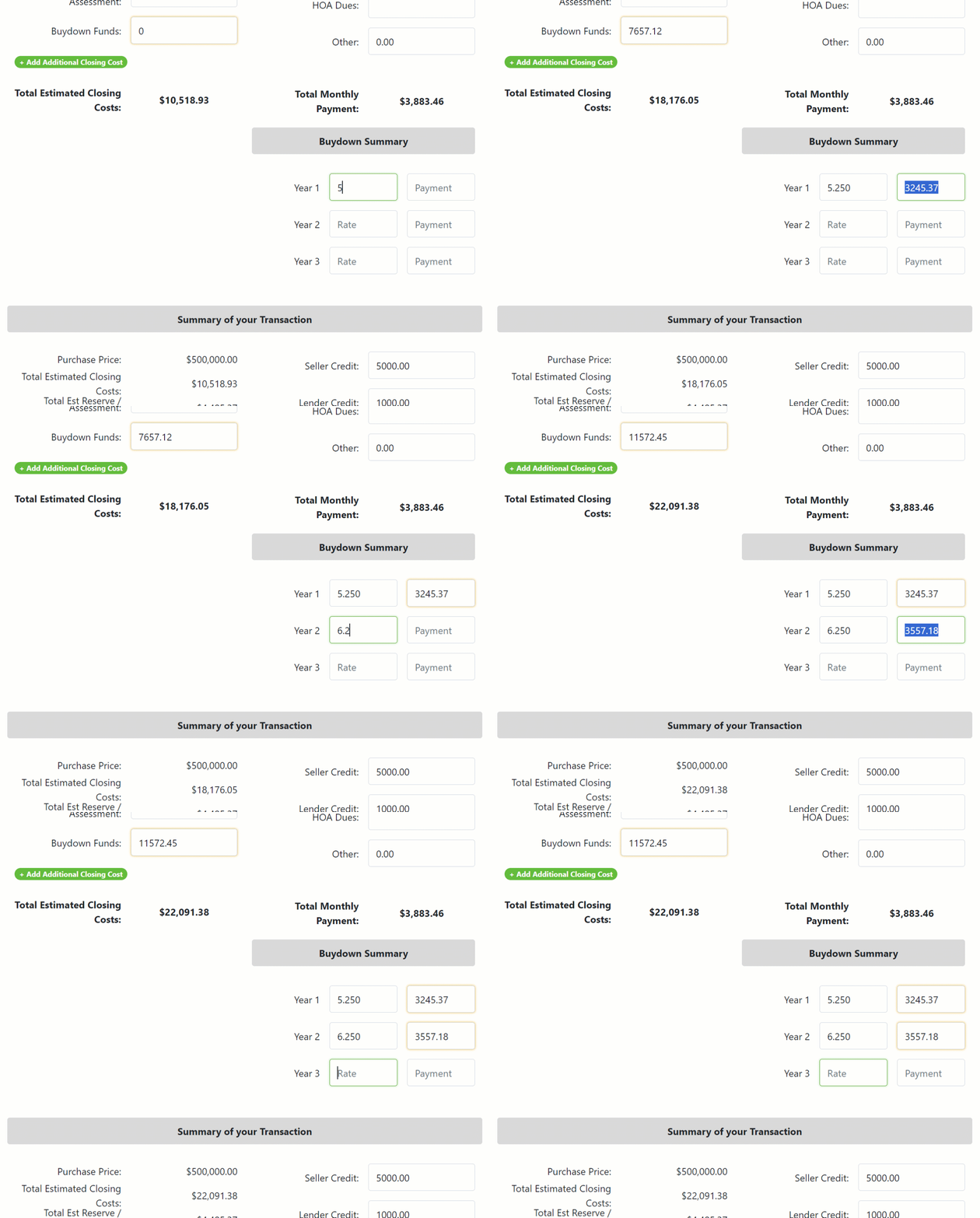
Fee sheets & templates, organized by client
Save a fully built fee sheet as a reusable template so your next quote starts 90% done. Keep every client's fee sheets and reports together, and pick up any deal exactly where you left it.
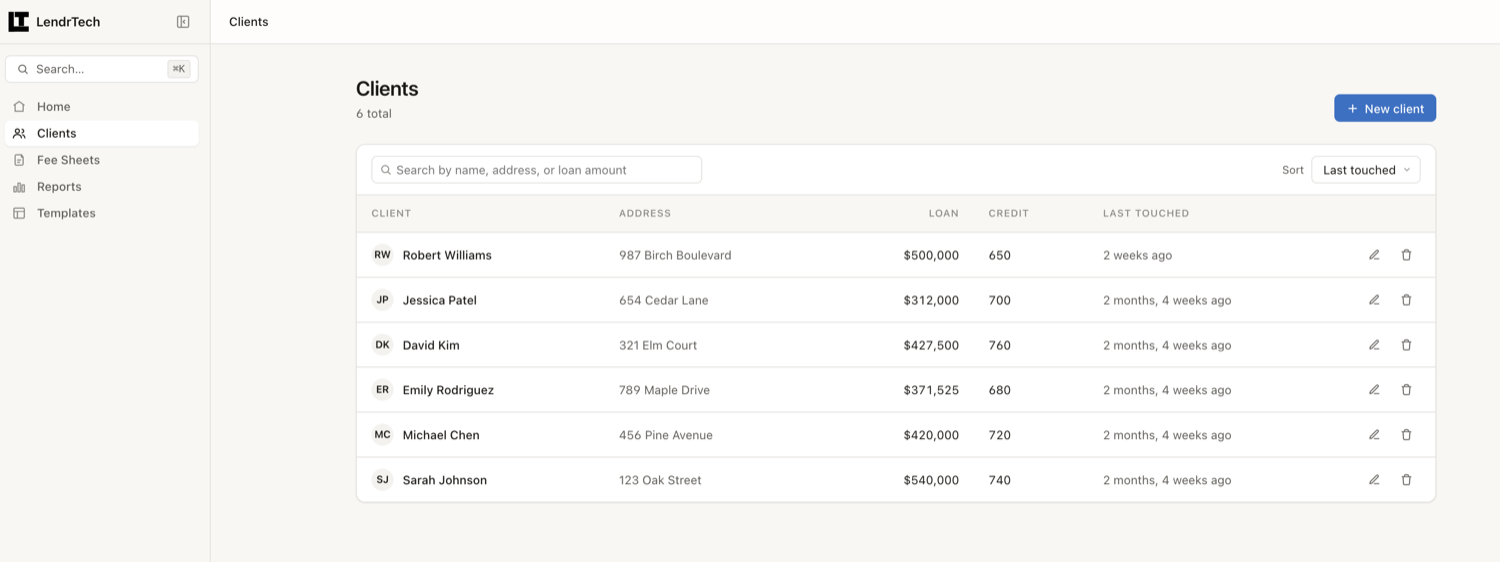
Send a PDF or share a live link
Email a pixel-perfect PDF or share a live link — either way your borrower sees the same clean report and can revisit it whenever they like. Nothing for them to download or sign up for.
- A PDF built for printFixed pages, your branding, the same numbers as the screen.
- A link short enough to textNo sign-in and no password for your borrower — the link is the key.
- Email it from LendrTechYou are copied on every send, so it is in your inbox too.
- Update and resendRate moved? Change the fee sheet and send the new one in seconds.
AI that reads, writes and builds — and never quotes.
The numbers a borrower sees are computed, not generated. LendrTech’s calculation engine does the math, the same way on every screen, and AI is kept to the work around it — reading the lender’s document, drafting the words, assembling the file. That line is the whole design.
It reads
Upload a lender fee sheet, Loan Estimate or Closing Disclosure and AI pulls the fees, prepaids and loan details into a fee sheet for you to check. Reading a document is a different job from pricing a loan — and only the first one is given to a model.
It writes
The cover email that goes with a report, and the short explanation of why you recommend the option you do — drafted from the report in front of you, grounded in its real figures. Then you edit it, because it goes out in your name.
It builds
Describe the scenario out loud and Sage assembles the clients, fee sheets and comparison report while you watch, stopping for your approval before anything a borrower would see. Or connect the AI assistant you already use and drive LendrTech from there.
Every draft is yours to edit before it goes anywhere, and nothing you upload is used to train a model. Read how LendrTech uses AI →
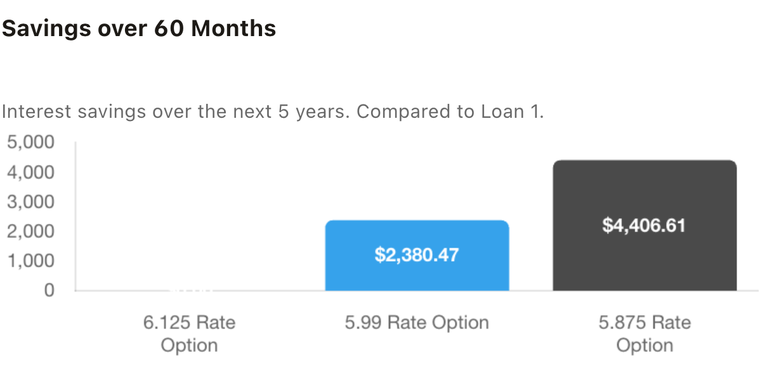
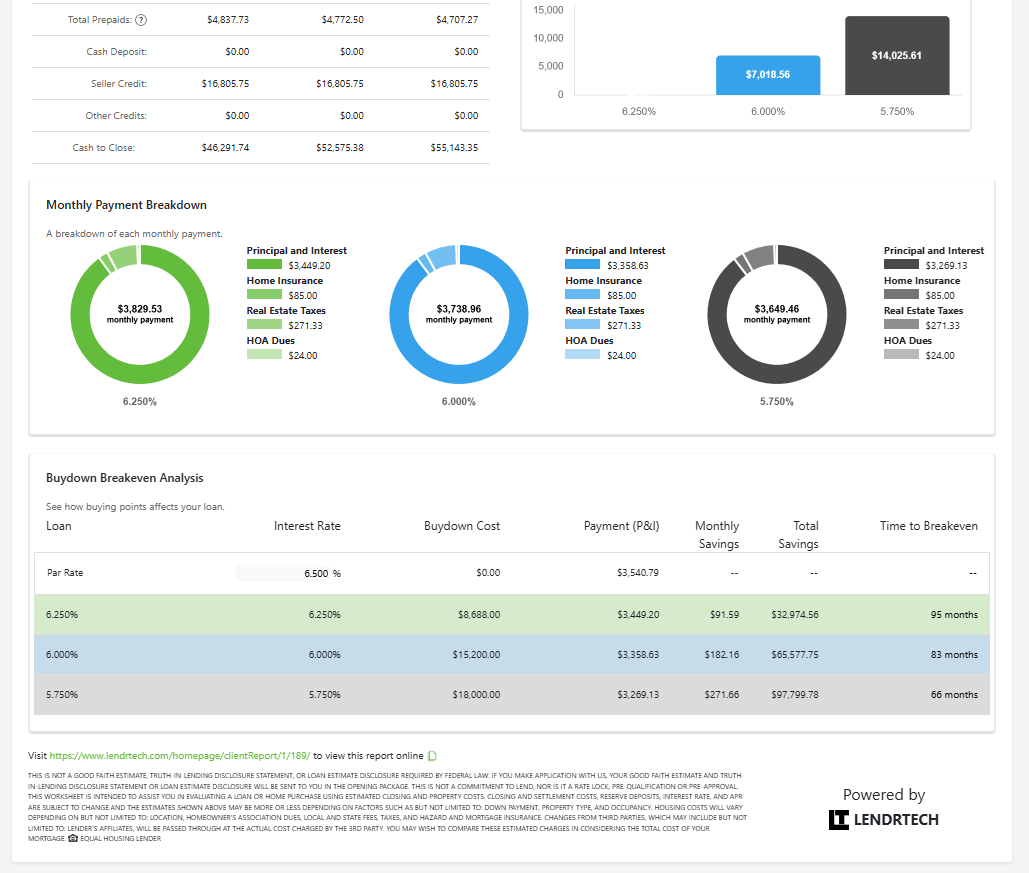
Built-in charts answer the questions every borrower asks.
No spreadsheet gymnastics — the visualizations that turn a quote into a conversation are built into every report.
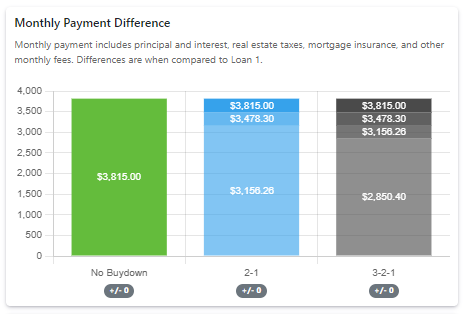
How would a temporary buydown affect my mortgage payment?
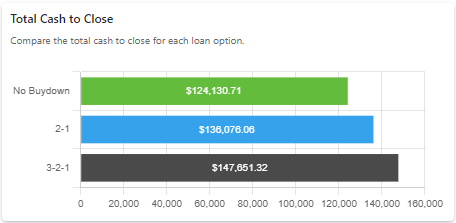
How much cash do I need to close this deal?
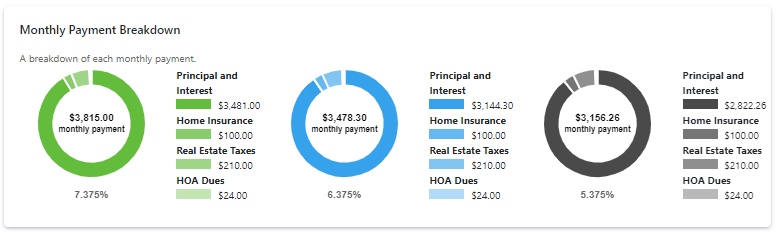
Principal and interest — what's all this other stuff?
How much will a lower rate actually save me?
The tools you reach for when the deal is close.
Everything above is on every plan. Max lifts the limits and adds the work that used to happen after hours — the borrower-facing report, the words that go with it, an assistant that builds the file for you, and the finishing touches: your colors on every report, and a recorded walkthrough to go with it.
A report your borrower can explore
Send a private, tabbed web report built for a phone, not a printer. Your borrower can open the fees, move the sliders in a what-if payment explorer, and see how each option actually differs — instead of squinting at page two of a PDF at 10pm. Purchase, refinance and single-loan reports each get their own layout.
- Tabs, not scrollingSummary, charts, fees, what-if and next steps.
- A payment explorerSliders that show which part of the payment moves, clearly labelled an estimate.
- Painted in your colorsYour theme, your branding, your disclosures on every tab.
- One-tap call or emailThe next step is always you.
Describe the scenario. Watch it get built.
“Set Sarah up with a 30-year at 6.25 and a 6.75 with a two-one buydown, then build me the comparison.” Sage does the clicking — client, fee sheets, report — showing each step as it goes. It asks rather than guessing when something is missing, and anything a borrower would see stops for your approval first.
- Plain language in, real records outClients, fee sheets, templates and all three report types.
- It shows its workStep rows tick off as it goes, with an Open it button at the end.
- It stops before it sendsEmails, deletes and email-address changes need your confirmation.
- It never invents a figureThe calculation engine owns every number.
The hard part was never the numbers
It was the blank message box at the end of a good report. Generate writes the whole borrower email from the report you just built — subject, greeting and message — and you edit it before it sends. Write the story drafts the short explanation of why you recommend the option you do, in language a borrower can follow. Both are grounded in the report’s own figures, so the words and the numbers agree.
- Grounded, not guessedIt writes from the report in front of it, never from thin air.
- Your voice, your callEvery draft lands in an editor first. Nothing sends itself.
- Fix or polish what you wroteOr write it yourself and have the tone tidied up.
- Reusable templatesSave the version that works and start there next time.
Bring the AI assistant you already use
Connect Claude — or any assistant that speaks the Model Context Protocol — to your LendrTech account, and it can build clients, fee sheets and reports for you from wherever you already work. A pre-approval lands in your inbox; you ask your assistant to set the borrower up, and it does.
- Connect onceAdd LendrTech as a connector and sign in — no keys to paste.
- It works in your account onlyYour clients, your fee sheets, your reports.
- It cannot delete anythingAnd it cannot email a borrower — sending happens in LendrTech.
- Every result links backSo you can open and check what it built.
Make every report your own
Set custom report colors to match your corporate branding so every report you send looks like it came from your shop, not a generic tool.
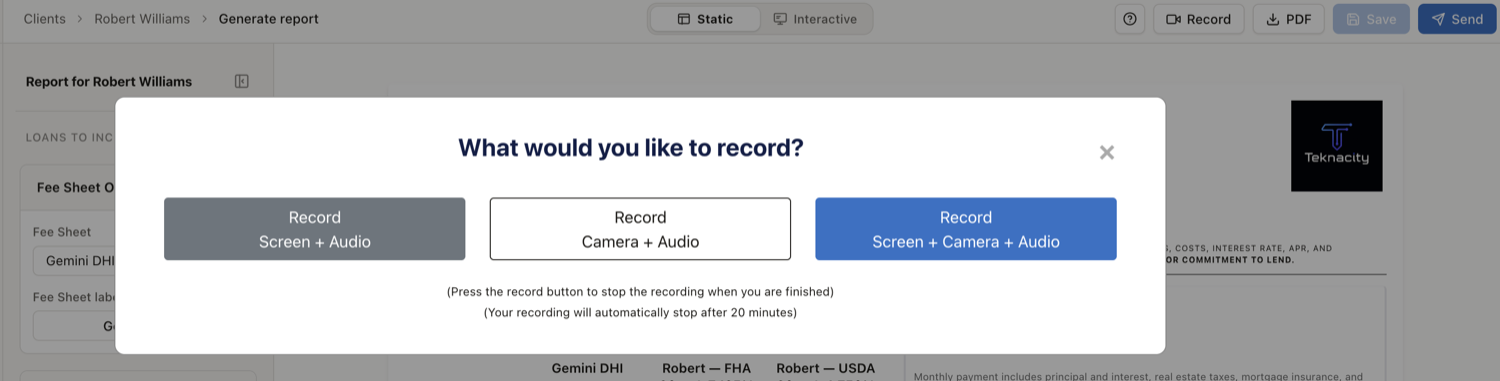
Record a walkthrough to go with it
Capture your screen, audio, and video to record a personal walkthrough of the report — so borrowers hear the explanation in your voice even when you can't meet in person.
The core toolkit, on every plan.
Whether you pay monthly or annually, every plan gets the complete fee-sheet-to-report workflow from day one — and Max lifts every limit on it.
- Purchase, refinance & single-loan reports
- Live, side-by-side loan comparisons
- AI fee sheet PDF import
- Reusable fee sheet templates
- Built-in explainer charts
- Transparent, editable pricing
- Sage, your in-app assistant
- Share by PDF or live link
- Your branding on every report
- Secure document management
- Unlimited imports, fee sheets & reports Max
- Interactive Reports Max
- AI-written borrower emails Max
- AI-written report story Max
- Sage Actions Max
- Connect your own AI assistant Max
- Screen, audio, and video recording Max
- Custom colors to match corporate branding Max
Ready to build your first report?
Start your free trial and send a borrower-ready report in minutes — or book a 30-minute demo first.
7 days free · card required · cancel anytime